


Pre-recording is available only when using Motion Detection and can be viewed exclusively during local playback. This feature is not supported for Smart Motion Detection (SMD), continuous recording, or through the Lorex app or cloud services. The duration of the pre-recorded footage may vary based on the recorder available cache memory at the time the event was detected, up to a maximum time set by the user.
Lorex products are designed for consumer and business use only and not for US federal governments,
federally-funded projects or contractors subject to NDAA.
All trademarks belong to their respective owners. No claim is made to the exclusive right to use the
trademarks listed, other than the trademarks owned by Lorex Corporation. We reserve the right to change
models, configurations or specifications without notice or liability. Product may not be exactly as
shown.
Apple, the Apple logo and AppleTV are trademarks of Apple Inc., registered in the U.S. and other
countries. App Store is a service mark of Apple Inc.
Google, Google Home, Google Play, Google Play logo, Google Assistant logo and Chromecast are trademarks
of Google Inc.
Amazon, Alexa and all related logos are trademarks of Amazon.com, Inc. or its affiliates.

Lorex Fusion 4K+ Ultra HD 12MP 16 Camera Capable (8 Wired + 8 Fusion Wi-Fi ) Network Video Recorder
Skip to product information


Fusion Series|
N910A62
Lorex Fusion 4K+ Ultra HD 12MP 16 Camera Capable (8 Wired + 8 Fusion Wi-Fi ) Network Video Recorder
Key Features:
- 4K Ultra HD 12MP Resolution
- Built-in 2TB Storage. Expandable up to 1 × 16TB
- Connect up to 16 cameras (8 Wired + 8 Fusion Wi-Fi)
- Works with the Lorex Classic mobile app
Become a Partner and Log in to access volume pricing, build your system, and place orders.
Add-ons
Quick Order
Become a Partner and Log in to access volume pricing, build your system, and place orders.
Product Compatibility List
AI Video Analytics
-
Displays movement density and activity patterns across the scene over a selected time range.
 Heatmap

- Searches recordings using detected license plate numbers and related metadata.
 Number Search

- Filters footage based on detected clothing or object colors.
 Color Search

-
Filters recorded footage by event type, object type, or selected visual attributes.
 Smart Search

What's Included
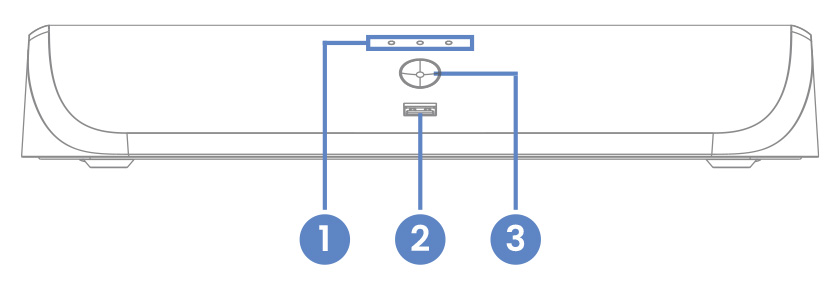
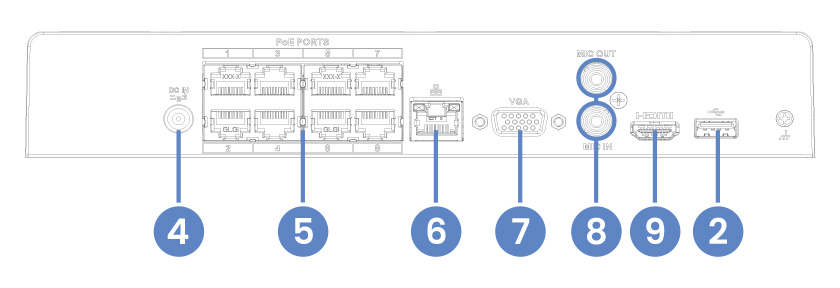
- Hard Drive, Power & Network Statuses
- USB Port
- Info / Panic Button
- Power Connection
- Camera Connection (PoE)
- Network Connection (LAN)
- Monitor Connection (VGA)
- Audio Out / In
- Monitor Connection (HDMI)
Package Contents:
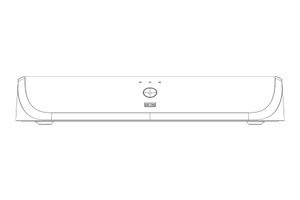
4K+ Fusion NVR
Ethernet Cable
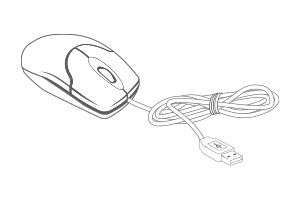
USB Mouse
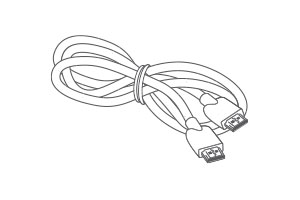
HDMI Cable
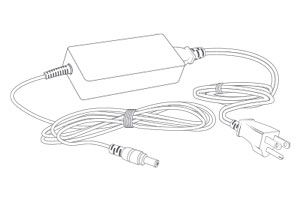
Power Adapter
- 4K (8MP) IP cameras are required to take advantage of 4K recording.
- Recording time may vary based on recording resolution and quality, lighting conditions and movement in the scene.
- Lorex Fusion supports compatible Lorex wired cameras and Wi-Fi devices with sufficiente signal strengh between the Wi-Fi devices and your Wi-Fi router. All cameras must be connected to the same network. For full details on Wi-Fi cameras compatibility and instructions, visit www.lorex.com/pages/fusion
- Controlling certain features in your security system requires a compatible smart device. Availability and performance of certain features and services are smart device dependent and may not be available in all areas or networks. For compatibility, features, and instructions visit www.lorex.com
- Compatible with certain Lorex IP and select wireless cameras only. For a list of compatible cameras please visit www.lorex.com/compatibility
- Accessing your security system remotely requires a high-speed Internet connection. Ensure your NVR has a wired connection to a router (not included). A minimum upload speed of 6Mbps is recommended for reasonable video performance.
- HDMI output supports 4K HD for high definition multi-channel live or recorded video viewing. Image quality and resolution is dependent on the type of camera connected to the NVR, as well as TV/monitor resolution.
- Detection types need to be supported by the camera.
Product Specifications
Product Support
Reviews
Overall rating: 4.0897436 / 5 from 156 reviews.
AI Generated Review Summary
The Lorex Fusion 4K+ Ultra HD 12MP 16 Camera Capable Network Video Recorder offers great picture quality, easy installation, and highly praised customer support. The setup process is straightforward, and the NVR is described as excellent and reliable. However, opinions on the system and unit vary, with some users finding the fan noisy and others appreciating its effectiveness.
Summary topics
- Picture Quality (7%): It was noted by customers that the picture quality of the camera was great, impressive, clear, and impressive.
- Installation Ease (8%): It was noted by customers that installation of the product was easy and hassle-free, making it highly recommended.
- Setup Process (8%): Customers appreciated the easy setup of the product, with multiple reviews mentioning the same aspects as the online manual.
- Customer Support (6%): Customers expressed appreciation for the great customer support provided by Lorex. (100% agreement)
- NVR Performance (12%): Customers keep praising the NVR, describing it as excellent, Reliable, and fantastic.
Review topics: ["quality","shipping","value","look","setup","installation","service","works","features","software","support","camera","design","interface","functionality","system","documentation","performance","upgrade","nvr","detail","tech","unit","lorex","picture","app","issues","fan","video","resolution"].
Review highlights
- "Good quality and customer service is great :+1:" —
- "Amazing product, easy installation, great app." —
- "Great quality - easy breezy setup." —
Reviews
This is my 3rd security
"This is my 3rd security system and all are functioning well. Customer and technical service is outstanding. Hence why this is my 3rd system. Buy Lorex and you cannot go wrong. Quality products that last! I encased my cameras in a self built birdhouse at the long entrance to our property!"
One comment on the log
"One comment on the log in of “Lorex” web site to view, only one single same household user about to view & will log out all the same household user, are you able to upgrade your system so that the same household user able log in simultaneously without logging them out. Thanks Alan Chee"
Great product. Installation was a
"Great product. Installation was a breeze. 4K+ Quality is on point. Upgrading from cloud based subscription system. So much more peace of mind knowing my system is more "local" and still works even when the internet is out."
Exchange
"Ordered the wrong product, they exchange it with no issue . The clarity is awesome, the product is amazing, the price is even better, they even gave me a discount. I’m one very happy customer. I highly recommend them if you are looking for security system."
The software is complex and
"The software is complex and can be challenging. The documentation is difficult to navigate. Setup took a few tries, to eliminate so many motion detection notifications. Resolution is amazing at the price point. Design of the unit fits well in my space."
Adding another N910 system was
"Adding another N910 system was very easy using the QR codes. I did find, using the iPhone for system settings easier than using the mouse on NVR."
A++++++++++++++ I would also like
"A++++++++++++++ I would also like to personally thank my salesperson for her patience, understanding, and knowledge. If it weren’t for her I wouldn’t have purchased the unit. Melanie you are a gem 💎 thank you so much 😊"
works quite well
"works quite well"
I've been most experienced with
"I've been most experienced with the H-series and NVR910. I don't think there is anything on the market that provides the highest quality 12MP (4k+) images at this pricepoint. I've been reasonably happy with the performance of the wired system. Haven't used the wireless fusion option yet."
Have been totally satisfied with
"Have been totally satisfied with all items purchased from Lorex. Long time customer and well pleased with customer service services. Can't go wrong with Lorex."
Q&A
- will this work with E871AB
- Yes, it will work. Please see the compatibility chart: https://www.lorex.com/pages/compatibility?dt=IP%20Camera&dp=412
- My N884A64B NVR just died. I'm thinking of switching to the N910A62 Fusion. Current wired cameras (3) E841CA-Z, (4) LNB9292 and (1) E893DD-E. a) will they all work on the Fusion? b) can I also add a B463AJDB-E doorbell? c) can the Fusion be accessed in a PC browser (via IP address) like the N884A64B?
- Please find below the link to all devices compatible with the N910A62 recorder: https://www.lorex.com/pages/compatibility?dp=399. For further assistance, please contact our Technical Support Team at 1-888-425-6739.
- Is this N910A62 NVR compatible with LNE9242B / LNE9252B Cameras?
- No, this recorder is not compatible with either the LNE9242B or the LNE9252B.
- Does this device have to be connected to a computer , also how do you update the software, through your phone?
- For initial setup, you must connect it to a display using a VGA or HDMI cable, then, you can use the software on your computer for remote access. For further assistance, please contact our technical support department. Technical support: 1-888-425-6739
- Is this compatible with my LNB3163 cameras
- No, this recorder is not compatible with the LNB3163 camera model.