


Lorex products are designed for consumer and business use only and not for US federal governments, federally-funded projects or contractors subject to NDAA.
All trademarks belong to their respective owners. No claim is made to the exclusive right to use the trademarks listed, other than the trademarks owned by Lorex Corporation. We reserve the right to change models, configurations or specifications without notice or liability. Product may not be exactly as shown.
Apple, the Apple logo and AppleTV are trademarks of Apple Inc., registered in the U.S. and other countries. App Store is a service mark of Apple Inc.
Google, Google Home, Google Play, Google Play logo, Google Assistant logo and Chromecast are trademarks of Google Inc.
Amazon, Alexa and all related logos are trademarks of Amazon.com, Inc. or its affiliates.

Lorex Fusion 4K+ Ultra HD 12MP 16 Camera Capable (8 Wired + 8 Fusion Wi-Fi ) 1TB Network Video Recorder
1TB
Product Compatibility List
AI Video Analytics
-
Displays movement density and activity patterns across the scene over a selected time range.
 Heatmap

- Searches recordings using detected license plate numbers and related metadata.
 Number Search

- Filters footage based on detected clothing or object colors.
 Color Search

-
Filters recorded footage by event type, object type, or selected visual attributes.
 Smart Search

What's Included
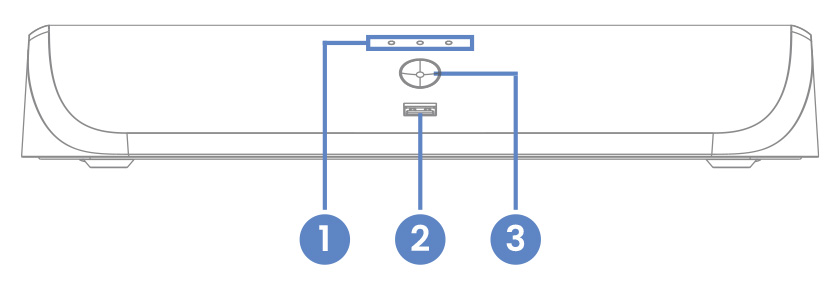
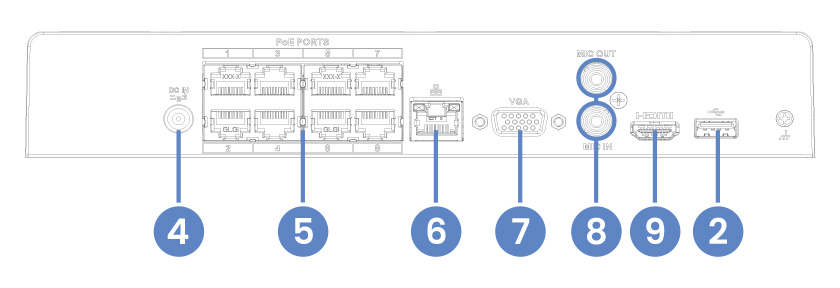
- Hard Drive, Power & Network Statuses
- USB Port
- Info / Panic Button
- Power Connection
- Camera Connection (PoE)
- Network Connection (LAN)
- Monitor Connection (VGA)
- Audio Out / In
- Monitor Connection (HDMI)
Package Contents:
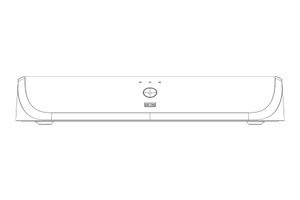
4K+ Fusion NVR
Ethernet Cable
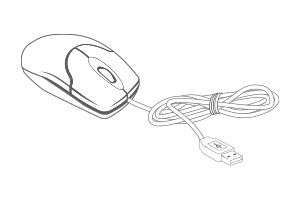
USB Mouse
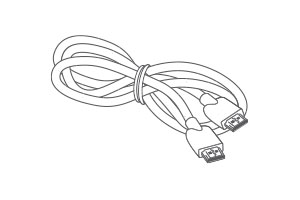
HDMI Cable
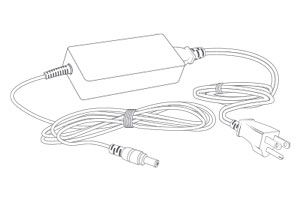
Power Adapter
- 4K (8MP) IP cameras are required to take advantage of 4K recording.
- Recording time may vary based on recording resolution and quality, lighting conditions and movement in the scene.
- Lorex Fusion supports compatible Lorex wired cameras and Wi-Fi devices with sufficiente signal strengh between the Wi-Fi devices and your Wi-Fi router. All cameras must be connected to the same network. For full details on Wi-Fi cameras compatibility and instructions, visit www.lorex.com/pages/fusion
- Controlling certain features in your security system requires a compatible smart device. Availability and performance of certain features and services are smart device dependent and may not be available in all areas or networks. For compatibility, features, and instructions visit www.lorex.com
- Compatible with certain Lorex IP and select wireless cameras only. For a list of compatible cameras please visit www.lorex.com/compatibility
- Accessing your security system remotely requires a high-speed Internet connection. Ensure your NVR has a wired connection to a router (not included). A minimum upload speed of 6Mbps is recommended for reasonable video performance.
- HDMI output supports 4K HD for high definition multi-channel live or recorded video viewing. Image quality and resolution is dependent on the type of camera connected to the NVR, as well as TV/monitor resolution.
- Detection types need to be supported by the camera.
Product Specifications
Product Support
Reviews
Overall rating: 4.230769 / 5 from 13 reviews.
AI Generated Review Summary
Summary topics
Review topics: ["nvr","motion"].
Review highlights
Reviews
cannot connect with lorex app
"cannot connect with lorex app to access through smart phone no matter what username or password I try it doesnt recognize and will not let me load up my account"
Excellent
"Excellent"
Pleasant Software Interface
"Easy to set up. No need to call tech support. Much better user interface software than the LNR 6108X-1 / Lorex Cloud App it replaced. One needed good vision though to make out the numbers assigned to the camera ports at the back of the unit. Stable 24/7 operation so far."
It is really, really hard
"It is really, really hard to pair the recorder to the devices and the app. After a lot of frustration, I was able to pair the recorder to the lorex classic and the camera, but I am still no able to find how to turn the light on for the device."
Great product so far. Purchased
"Great product so far. Purchased to replace a failed N843 NVR. Had trouble getting the WIFI camera's connected and your Technical Assistance helped me through that task. Overall everything is good."
Getting the cameras in the
"Getting the cameras in the App was easy. If you have to add them to the NVR it's not that easy. You need to add a wizard to make it easier."
Great Nvr
"Its a great NVR easy to install and program"
A great little NVR for
"A great little NVR for most applications! Between the price, size, 8-POE camera connections, and Fusion Wi-Fi connectivity, this NVR packs a great punch for the price for smaller camera systems. My only suggestions for potential improvement - 72 Watts is relatively limiting for camera power capacity - have to add a POE injector if running close to 70 Watts. Also nearly all of these I've installed I immediately upgrade to a 16 TB HDD - wish LOREX would sell them with those HDD's already installed. FYI this NVR WILL WORK FINE with an LN-Z81P25 4K PTZ camera - you just have to have the right settings enabled. At Red Handed Security near Lake Geneva, WI - we have installed at least 4 of these without issue."
Working great
"Working great"
Fusion NVR
"Screen glitches with a horizontal shake every couple minutes"
Q&A
- Will it accept the 20 or 24tb Seagate Skyhawk AI? An extra 50% above the current max 16tb would be significant.
- No, this system has 1 bay where you can connect up to 16TB (SATA), it could be Seagate hard drive.
- Do you sell a version without a HD? It seems like a waste to toss out an 1tb drive. Will it accept the 20 or 24tb Seagate Skyhawk AI? An extra 50% above the current max 16tb would be significant.
- No, we don't offer packages without the hard drive, but you can contact our sales department; they'll be happy to help you customize your order. Sales Help: 1-888-425-6739
- Can this NVR accept 12 wired connections if I am using a PoE+ switch on the same network? Or is 8 wired a hard limit
- No, you can install up to 8 wired cameras even if you use a PoE switch.
- Will this work with cameras from an older Lorex system? I have a LNR 400 series system that no longer works, would like to use my existing wired cameras get an updated NVR
- You must check the model of your cameras to validate if they are compatible with the N910A6 recorder model. You can call our sales team who will be happy to help you find a compatible recorder for your old cameras. Sales Help: 1-888-425-6739
- What is the recommended internet speed/Latency needed to access the stored recordings from my iPhone?
- A minimum upload speed of 6Mbps is recommended for reasonable video performance.