


All trademarks belong to their respective owners. No claim is made to the exclusive right to use the trademarks listed, other than the trademarks owned by Lorex Corporation. We reserve the right to change models, configurations or specifications without notice or liability. Product may not be exactly as shown.
Apple, the Apple logo and AppleTV are trademarks of Apple Inc., registered in the U.S. and other countries. App Store is a service mark of Apple Inc.
Google, Google Home, Google Play, Google Play logo, Google Assistant logo and Chromecast are trademarks of Google Inc.
Amazon, Alexa and all related logos are trademarks of Amazon.com, Inc. or its affiliates. 2-way communication is not available via Alexa.

Fusion DVR 4K 12 Camera Capable (8 Wired and 4 Fusion Wi-Fi) 2TB DVR
$197.99
Sale price
$197.99
Regular price
$329.99
Product Compatibility List
AI Video Analytics
-
Triggers alerts when objects or individuals cross a defined virtual boundary.
 Virtual Fence

-
Detects human presence in the footage and records related activity.
 Person Detection

-
Detects vehicles within the camera’s field of view and logs their presence.
 Vehicle Detection

-
Identifies known individuals in the footage based on stored face data.
 Face Recognition

-
Filters recorded footage by event type, object type, or selected visual attributes.
 Smart Search

What's Included
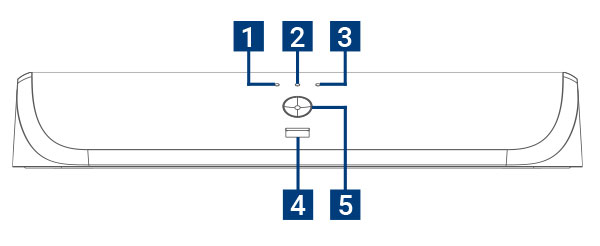
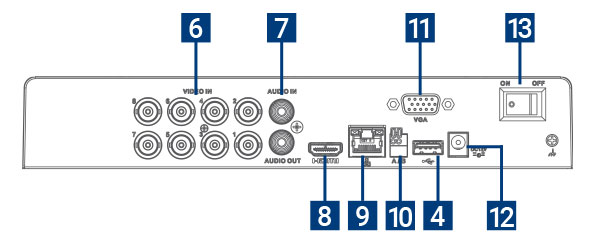
Dimensions (W×D×H): 12.9 × 9.6 × 2.1" (328 × 245 × 53mm)
Weight: 2.75 lbs. / 1.26 kg (excl. HDD)
- Hard Drive LED
- Power LED
- Network LED
- USB Ports
- Info / Panic Button
- Video Inputs
- Audio In / Out
- HDMI Port
- LAN Port
- RS-485 Port
- VGA Port
- Power Port
- Power Switch
Package Contents:
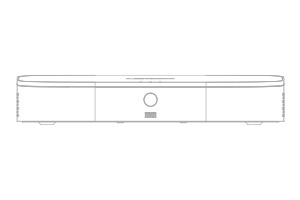
4K Fusion DVR
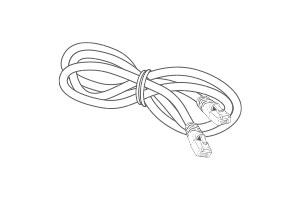
Ethernet Cable
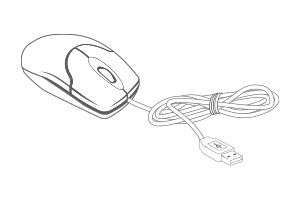
USB Mouse
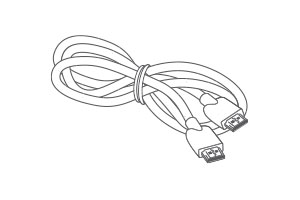
HDMI Cable
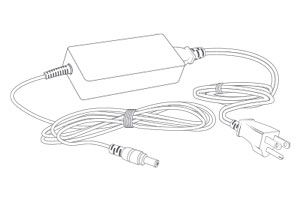
Power Adapter
- Recording time may vary based on recording resolution and quality, lighting conditions and movement in the scene.
- Accuracy of Smart Motion Detection or Person and Vehicle Detection will be influenced by multiple factors, such as the object’s distance from the camera, the size of the object, and the height and angle of the camera. Night vision will also impact the accuracy of detection.
- Accuracy of Face Detection and Face Recognition will be influenced by the distance of the face from the camera. Partially or fully covered faces will not be detected. Night vision will impact the accuracy of Face Detection. Facial recording without consent is illegal in certain jurisdictions. Lorex Technology does not assume liability for any use of its product that fails to conform with local laws.
- Face Detection and Face Recognition are available on up to 2 channels only. Smart Motion Detection can not be enabled on all channels while Face Detection or Face Recognition is enabled.
- Virtual Fence is available on up to 2 channels only. Smart Motion Detection can not be enabled on the same channel when a single channel is enabled. To enabled Virtual Fence on 2 channels, Smart Motion Detection must be disabled on all channels.
- Compatible with select Lorex cameras only. For a list of compatible cameras, please visit www.lorex.com/compatibility
- Controlling certain features in your security system requires a compatible smart device. Availability and performance of certain features and services are smart device dependent and may not be available.
- Requires a high-speed internet connection and a router (not included) for remote access. A minimum upload speed of 7.5Mbps is required for the best video performance. Up to 3 devices may connect to the system at the same time. For the latest list of supported apps and devices, please visit: www.lorex.com/support
- Both firmware and software must be updated to latest version to ensure remote connectivity in all areas or networks. For compatibility, features, instructions visit: www.lorex.com
- HDMI output supports up to 4K for high definition multi-channel live or recorded video viewing. Image quality and resolution is dependent on the type of camera connected to the DVR, as well as TV/ monitor resolution.
- AppleTV™ or Chromecast™ need to be connected to the same network as your recorder. Requires AppleTV Gen 4 or newer with Lorex Apple TV APP or Chromecast ™ device connected to the TV that you want to view the system on.
Product Specifications
Product Support
Reviews
Overall rating: 4.5463414 / 5 from 205 reviews.
AI Generated Review Summary
The Fusion DVR 4K 12 Camera Capable offers top-of-the-line quality, sharp and clear pictures, and a user-friendly system. Customers appreciate its easy setup and great recording capabilities. However, feedback on the app and support is mixed.
Summary topics
- Customer Service (6%): Customers keep praising the great service provided by the company, with multiple reviews highlighting its friendliness and helpfulness.
- System Usability (8%): Customers expressed appreciation for the system, stating that it works very well and is easy to use.
- Setup Ease (5%): It was highlighted by customers that the setup of the product was easy and quick, with no negative reviews mentioned.
- Picture Quality (9%): Customers appreciated the sharp and clear pictures provided by the product, making it a popular choice.
- Product Quality (4%): It was highlighted by customers that the quality of the product is top of the line and highly recommended.
Review topics: ["improvement","quality","service","works","setup","support","replacement","issues","connection","display","upgrade","price","installation","features","reliability","dvr","functionality","instructions","picture","camera","system","app","unit","lorex","device","recordings","resolution","internet","process","set"].
Review highlights
- "Better quality picture and more features." —
- "Lorex have very good quality products, my friends are amazed at the pictures quality, I would always recommend." —
- "Products are very well made and great pictures!" —
Reviews
I bought a new DVR
"I bought a new DVR and cannot get it to set up a password. I have called support numerous times, been put on hold, and have never been able to talk to anyone. It has been almost two months now, and it is still not set up where I can get recordings. I sent an email last week to support, and I have still not heard back from anyone. I have three other recorders on different sites, and they came with a temp. password to use. This one did not."
I upgraded my original DVR
"I upgraded my original DVR for this newer version so I could add a wireless camera. It detected areas outside the designated zones, every time a tree branch or my flag moves. I adjusted the sensitivity, adjusted the zones, nothing works. Other than turning off notifications, but then. . . why have a camera. The DVR filled in less than a day. This did not make me happy."
Have to contact customer support.
"Have to contact customer support. Live view through the app is a fraction of the speed it should be [not playback; live view resulting in skipping], and I have another dvr as well for another floor which works fine [same network & switch]."
Product is excellent and working
"Product is excellent and working fine with my old cameras. The installation was fairly simple. I didn’t like that I had to join Just Answer to get answers to the issues I was having and told I needed a new unit."
Needed to upgrade older one
"Needed to upgrade older one and this was a great upgrade at good price"
Resolution looks very good contact
"Resolution looks very good contact at lorex tech support gave me all the help I needed to get everything done"
Some of your employees have
"Some of your employees have patience and some do not have patience. When you call for help especially if there is something that is new and you do not understand you need to speak who has patience. Some of you employees are also hard to understand and that makes it very uncomfortable. You asked and I answered. Hope this helpful. Kindness goes a long way."
Not as smart as the
"Not as smart as the fusion so still tryin to get it to find my F861 camera and phone."
The camera is great, it
"The camera is great, it shows me being robbed and can't do anything about it"
Good quality pictures with the
"Good quality pictures with the DVR box compared with my old replacement"
Q&A
- I bought a new tv to monitor my cameras, I hooked up the system (D881A82B) and turned it on I received this message "Mode not Supported"
- This happens when the monitor and recorder do not have matching resolutions. For the situation you are describing, you will need to reach our technical support team via phone (1.888.425.6739), as they can guide you properly to troubleshoot the issue. They are available Mon - Fri: 9:00 am - 8:00 pm EST.
- I have cameras already set up that came with my Lorex 8ch 4k MPX DVR 1HDD NTSC Model No: LHV5108W-D Will this work DVR work with those cameras? Thank you
- Please provide your camera model so we can check its compatibility with this recorder. You can also contact our sales team, who will be happy to help you verify compatibility. Sales Help: 1-888-425-6739
- I have a QSEE system of 8 wired cameras. would they be compatible with any of your hard drives
- Contact our sales team, they will be happy to help you check your device's compatibility and upgrade to the best available option. Sales help: 1-888-425-6739
- How to I configure the DVR to record video from the C884DA 4K camera at a frame rate greater than 7 frames per second?
- The camera can record at the following resolutions and frame rates: 4K at 7 fps 5 MP at 12 fps 4 MP / 3 MP at 15 fps 1080p / 720p at 30 fps
- I have a C884DA camera connected to the DVR, but the highest frame rate that I can select is 7fps no matter what resolution is selected. The camera specs say that it can achieve 15fps.
- The camera records at 7 fps in 4K resolution, 12 fps in 5 MP resolution, and 15 fps at any lower resolution.